Friday, 27 January 2012

Create a sitemap

A sitemap is like a giant crossroads for the Robot. Or, it's like a city that has direct roads to any other city in the country. It's a spot from which the Robot can get to any place easily.

In its simplest terms, a sitemap is a list of the pages on your website. Generally, there are two types of sitemaps.

An HTML sitemap is made both for human users and for Search Engines and helps them easily find the information they need.


An XML Sitemap (it's normally called a Sitemap, with a capital S) is for Search Engines only. Create and submit a Sitemap, and thus you'll make sure that Search Engines know about all the pages on your site, including URLs that can't be naturally discovered by Search Engines' crawlers.


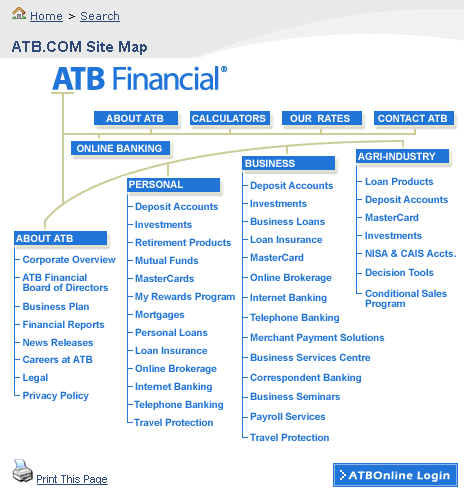
A good example of an HTML sitemap is here:
Example of an HTML Sitemap
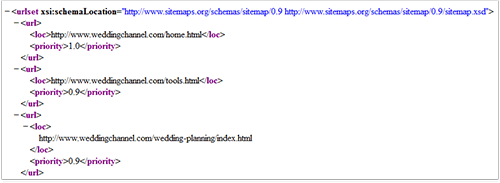
Now what do you need, so that the Robot can visit all your pages, fast? Right, an accurate overall sitemap. Here you can download a tool to make Sitemaps:
http://goog-sitemapgen.sourceforge.net/

In fact, there're hundreds of tools of the kind. You can use this one, for example:
http://www.xml-sitemaps.com/

As soon as you've made your Sitemap, you have to submit it to Search Engines. The procedure of submission varies for different Search Engines. I'll now only help you with three biggest ones. Here you can find guidelines for Google.com (they have a webmaster tools section that helps you out):
http://www.google.com/support/webmasters/bin/answer.py?answer=40318

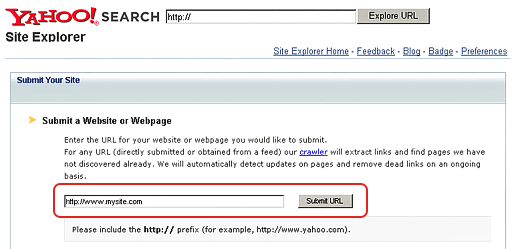
Here's a link to Yahoo.com submission form:
(at the bottom of this page, you see a form to submit a URL of your sitemap file).

Right now, MSN.com doesn't have a similar submission form. So to submit your sitemap, simply add the following line to your robots.txt file (you'll read about robots.txt just a bit later):
Sitemap: http://www.yoursite.com/sitemap.xml


Provide the complete URL for your Sitemap on this line, and MSN's crawler will pick it up.

If you need to submit to other search engines, look them up for instructions. Go to the Search Engine you need and type in submit sitemap and name_of_the_search_engine. You'll find a submission form, or just some instructions, like in MSN.com. Follow the guidelines you get, and — here we go: you not only invited Search Engines' Robots to visit your site, but ensured comfortable and easy travel!

Note! Sitemap has links to all pages that you've got on your site. So when you make a new page, don't forget to add it to your sitemap, too. You won't need to submit it to Search Engines again, just update the sitemap itself.


Invite robots to your site

1) Submit your site to Search Engines


Yes, let's send each Search Engine's spider a personal invitation to visit your site.

Baby-simple: go to the Search Engine that's important to you, and type in "add URL to name_of_the_search_engine", then follow the link you see, enter the necessary data and thus submit your website to this Search Engine.


Note! Search Engines don't expect you to submit all your webpages (just think of some forums that have a few thousand pages — the owner would go crazy submitting them!). All you have to do is submit your homepage.

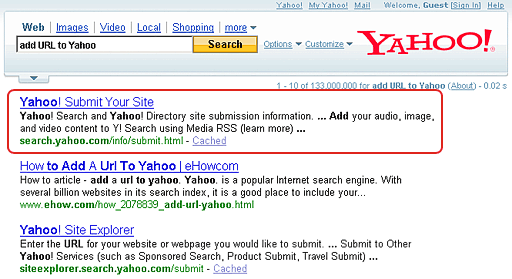
Want an example? Here we go with Yahoo!.


 I go to http://www.yahoo.com , type in add URL to Yahoo,


follow the necessary link ( http://search.yahoo.com/info/submit.html ) in the results page,


and get to the page where I enter my website's URL.
Click Submit URL — and that's it.

Submit your site to all Search Engines that you think are important, and the crawler will come to your site to look at it. What Search Engines are a must for you? First of all, these are: Google.com, Yahoo.com and Bing.com. For your convenience, here're the pages from which you start in these three:

If you expect clients to come from, say, Belgium or Germany, it's good to submit to their regional versions like Yahoo.de or Google.be. Also, if there's a special local Search Engine in your country, like Yandex in Russia, or Seznam in Czech Republic, it's also important to you.

Note! It won't take much of your time to submit to search engines, but it may take quite a long time till the crawler visits your site. In my practice, it took up to 6 weeks. And, it also depends on the Search Engine.

For instance, the elder of my sons Mike launched his personal website 16 days ago, and it got indexed by Google the day before yesterday, but he's still waiting for Yahoo!'s crawler to come.

For this reason, here's another thing I believe you should do:

2) Put a FAT link to your website

Quite logically: if the Google spider loves some web page and visits it quite often, and that page has a link to your site, then this Google crawler will be happy to follow the link and look at your site, too. Same thing about other Search Engines.

So here's what I'm driving at: try to get a link from some respected web page with a good Page Rank (preferably 4 and above).

DO IT NOW! Submit your website to search engines, or put a good link to your site, or do both.

Thursday, 26 January 2012

Making Your First Ranking Report

I know you already have a massive list of great keywords, and it's good enough to start. Still, there's yet another thing to take care of now. I mean, there must be a way to see how well your site is doing. How are you going to check your progress?

Some will ask, why check it at all? But how can you know for sure that you're doing the right thing, if you don't have good evidence?


 Any check is an impulse to the subconscious that forces you to do better. A real-life example comes from sports: after sportsmen start evaluating their results regularly, their achievements jump up 20% — and this is just because of measuring success, all else is done the same way!


In SEO, the traditional solution is to make keyword ranking reports at least once a week. (I do it daily, though. With the software I use, it's a minute's business.)

Now look at your watch. It shows a good moment for your first ranking check :-)


Option 1: Measure keyword rankings with your own hands


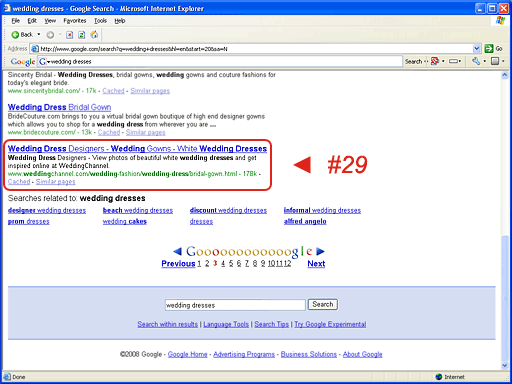
Here's a way to do it manually: type in a keyword in the search engine where you wish to check the ranking, then find your site in its result pages and check what place it's on.


Checking Google ranking manually
Pretty hard to do, I know. But you can automate part of the work — here's a quick list of free resources to use for evaluation of your keyword rankings:
What's good about them is, they're free and good enough.

What's bad, then?

First of all, they only check Google.com, Yahoo! and MSN (Live). So if you need, say, Google.de, or Ask.com — then do all the job manually, or USE THE TRACKER TOOL I describe further.

And another thing. Well, they just won't remember you. If you come after a month to make another check, you'll have nothing to compare with. You can only keep your previous results yourself, if you invent a way to do so.

Also, most of these free resources require Yahoo! and Google API keys. This makes the work inconvenient, because API keys put certain limitations on the number of queries you can perform.

Search engines do not want multiple or automated queries (and SEO work is impossible without them), so they require API keys — it's like an allowance to quire search engines.


Still there's a non-free Rank Tracker tool, which not only checks your rankings instantly, but also shows your progress and doesn't necessarily need a Google API key — so it's great to evaluate your work.


FREE BEST KEYWORD RESEARCH


FREE KEYWORD RESEARCH 

First of all make a list of every word or phrase you can think of that people might use to find what your site offers. Then  use an Excel spreadsheet to put each keyword as a separate record in it, as you'll need to do some calculations later.


USE THE WEB TO GET MORE


Once you have a good starting list of 20-40 words, use search engine databases to refine it and see what people have actually searched for when looking for similar sites. Here're the three most popular resources for doing that:

Wordtracker (http://www.wordtracker.com/) That's a paid service for regular use, but it offers the benefit of a free version, which can be used to complete your keyword research if you are fairly organized.

Free Wordtracker (http://freekeywords.wordtracker.com/) is almost equally useful as the paid one. If you enter your main keyword, Wordtracker lists out suggestions for other popular search terms that contain that particular word or phrase. However, like any free tool, it has a few downsides. For instance, it won't store your keywords for future use, it only gives you 100 suggestions and lets you get suggestions for just one word at a time.

Google's Keyword Tool (https://adwords.google.com/select/KeywordToolExternal) Quite a useful thing. Select to generate keyword ideas with Descriptive Words or Phrases. Enter a keyword for the start and go ahead to get a nice list of keywords.

Keyword Discovery (http://www.keyworddiscovery.com/search.html) This search term suggestion tool can also be quite helpful, as long as it's free. The drawback is again, that you can only ask for suggestions for one keyword at a time, and won't be able to check more than 100 keywords daily. Besides, like the rest of free tools, it won't store your keywords for the future.


ONE CLICK TO CHOOSE BEST KEYWORDS

Now the time comes to see how keyword software makes the final decision swiftly and gracefully. So I'm anxious to say, it's already there. Rank Tracker is done with keyword research — and with the choice as well.


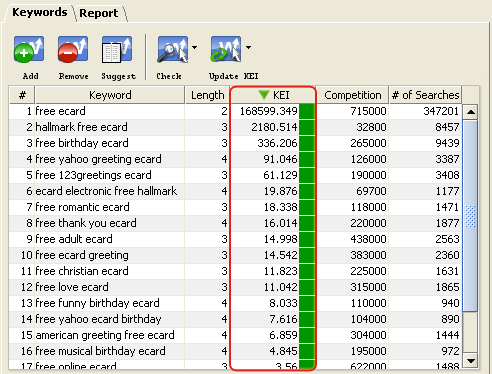
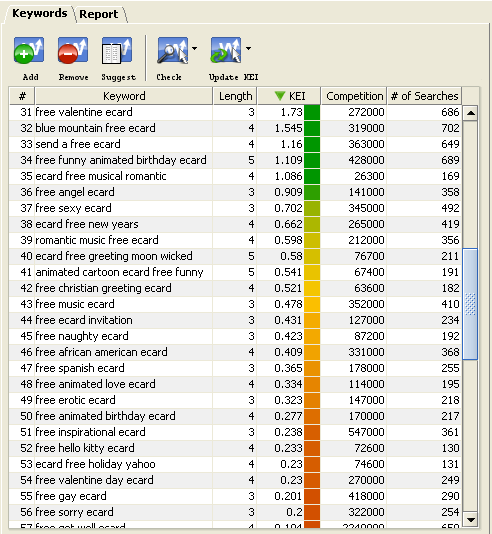
   Let's have a look. On the right of the keyword tool's window, find the combo box with workspaces and choose Keyword Research View. Now you can see a column with KEI. In this column, the tool has put a color marker for each word, ranging from green to red.

So, What's KEI and Why Do We Need It?


keyword efficiency index is an SEO know-how. It shows you how good a keyword is for bringing traffic to your site. Or, putting it simple, how much positive effect keywords have on your paychecks.


You need keywords with high KEI. The greener the marker is in Rank Tracker, the better the keyword. So just sort keywords by KEI (click the header of the column), and separate the best keywords from non-worthy ones. And, you can just remove the keywords having bad KEI.


Leave about 100-130 keywords. First, pay attention to the top 5 ones. You'll use them a lot to optimize your website. The next 30 will be a good alternative, say, to create variations. Then, the remaining terms are good enough and should be there just in case.

DO IT NOW! Calculate KEI for your keywords, sort them out and choose 5 best keywords, 30 alternative ones, and leave 65 more to be able to create more variations.